Follow us on

Get your iOS devices ready for service

Allow these steps before you take your device to our Apple Authorized Service Provider. If your device won’t turn on or respond, finish as many steps as possible:

Note: We are not responsible for loss of customers' data.
Learn More
Customers are responsible for their device backup.
Have your Apple ID password ready. For some repairs
Bring your sales receipt (if possible),in case your service requires proof of purchase.
Bring your device and any accessories that you need help with.

Get your Mac OS devices ready for service

Allow these steps before you take your device to our Apple Authorized Service Provider. If your device won’t turn on or respond, finish as many steps as possible:

Note: We are not responsible for customer’s data.
Learn More
Make a backup: Making a backup is an important part of preparing your Mac for service. Time Machine makes it simple to back up and restore all of your files, and other backup methods are also available.
Gather your information: If you still have your sales receipt, bring it with you to the service location. You might also need your Apple ID password. You should know the name and password of your macOS user account, in case you need to log in to your Mac at the service location. And if you’re also using a firmware password, please turn it off before you get service.
Gather your products: Bring your Mac, power cable, and any accessories that you need help with.

Service Labour Charges

Our iOne Service Apple Authorized Service Provider (AASP) is conveniently located on the 2nd floor of the iOne Building along Mao Tse Tung Boulevard, in downtown Phnom Penh, Cambodia.

Support Services
Labour Charges
iPod Touch OS Restore
$15.00
iPhone / iPad OS Restore
$15.00
Mac OS X Restore (2017 earlier)
$15.00
Mac OS X Restore (2018 later)
$25.00
Application Troubleshooting
$15.00
Hard Ware Diagnostic
$15.00
Reset EFI Password (Firmwar Password)
$50.00
Clean iMac/Mac Pro
$50.00
Clean Macbook Pro Retina/Macbook Pro/Macbook
$50.00
MainLogic Board Macbook/Macbook Pro/Retina
$50.00
Main Logic Board iMac
$50.00
Sub Board
$35.00
Hard Drive ( include Mac OS Restore Service fee )
$50.00
Top Case
$50.00
Speaker
$35.00
Track Pad
$35.00
Ram iMac 21
$50.00
Ram iMac27
$35.00
AirPort Card
$50.00
Display Clamshell (Screen)
$50.00
Fan
$35.00
Power Supply
$50.00
Replace Touch ID (Mac)
$50.00
Graphic Card (Desktop)
$50.00
Cable Types
$35.00
Adapter
$35.00
Data Transfer under 80GB
$35.00
Data Transfer under 200GB
$50.00
Bottom Cover
$35.00
Battery (MacBook Air 2017)
$35.00
Battery (MacBook Air 2018, Bottom Case and Top Case)
$50.00
Battery (iPhone)
$35.00
Exchange Service (iPad)
$30.00
Exchange Service (iPad 2018 later)
$50.00
Exchange Service (iPod)
$30.00
Exchange Service Whole unit (iPhone 8 later)
$50.00
Exchange Service Whole unit (iPhone 7 earlier)
$30.00
iPhone Speaker
$30.00
iPhone Taptic Engine (Vibrator)
$30.00
iPhone Camera
$30.00
iPhone Display (iPhone 8 earlier)
$30.00
iPhone Display (iPhone X later)
$50.00

Watch Our Video Tips And Tricks

Our iOne Service team of Apple experts regularly shares the latest tips and tricks videos in this section. You don’t want to miss it!

Check other video? Watch now

How to setup your devices?

Setting up your devices is easy. Learn how to set up your iPhone, iPad, Mac, or Apple Watch.

Get started with your iPhone or iPad

Find out how to set up your iPhone or iPad.

Learn More
Image link
Image link

Get started with your Apple Watch

Find out how to use your iPhone to set up your new Apple Watch.

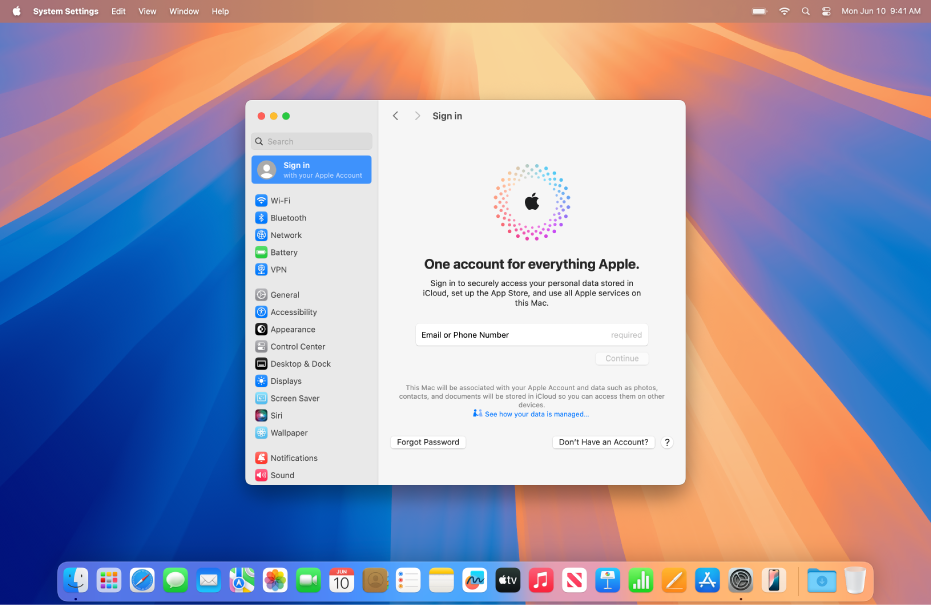
Get started with your Mac

You can set up and start using your new Mac in no time. Sign in with your Apple ID, choose a desktop look, change common settings and more.
Learn More
Image link

Check your device's coverage

One place to see your coverage and get AppleCare protection for your devices.
Image link

Make an appointment for service repair

It is a long established fact that a reader will be distracted by the
readable content of a page when looking at its layout.

    iOneGPT | AI Customer Service Chatbot